


System events track administrative and user actions that occur through the Domino platform interface and APIs. Domino records these actions as system events:
-
Project creation, cloning, archiving, and configuration
-
Dataset creation, updates, snapshots, and platform access
-
Repository file operations via the UI
-
User and role management
-
Application, job, workflow, and model lifecycle activity
-
Governance workflows, approvals, and findings
-
NetApp-backed volume and external data source management
-
Central configuration changes
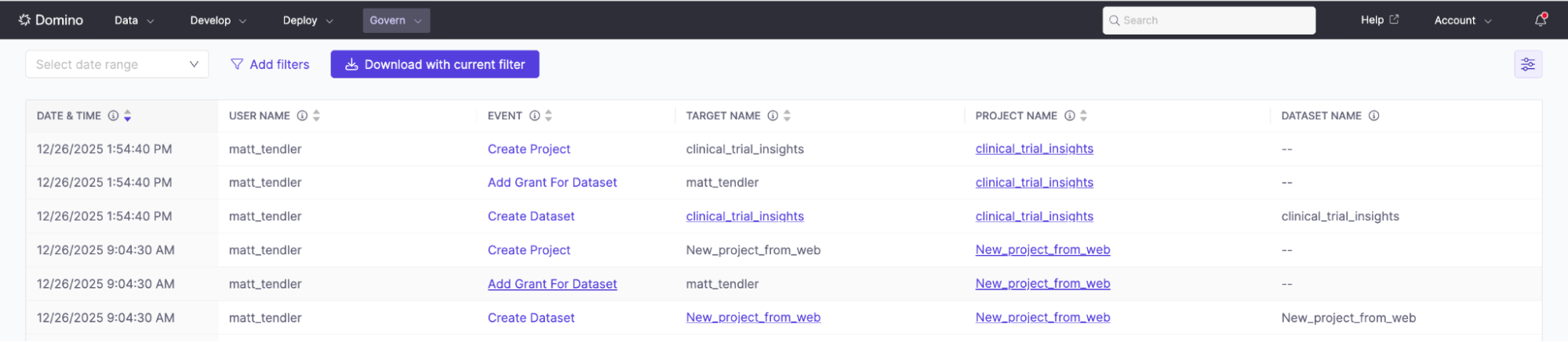
The Audit Trail table displays event name, timestamp, user, and target resource.
-
Go to Admin > Audit Trail to open the event table.
-
Select Add filters, choose an attribute, select an operator, and enter one or more values.
-
Add more filters as needed.
-
Select any event row to view full details.
Export filtered audit data for reporting or archival.
From the API
Use the Audit Trail API to programmatically access system events.
-
Authenticate with standard Domino API credentials
-
Filter by time range, user, event type, or resource
-
Export data for external reporting or archival
-
Use the Domino Audit Trail: Overview of Domino’s unified audit capabilities
-
Workspace File Access events: How Domino captures file-level operations in workspaces
-
Audit Trail APIs: Programmatically query and export audit events