


Platform events track user and system actions in Domino, including project creation, dataset updates, user role changes, and permission modifications. These events are separate from Workspace File Audit events, which capture file-level access inside workspaces.
To open the Domino Audit Trail, go to Admin > Audit Trail.
Events appear in a table with columns for event name, timestamp, user, and target resource. To filter events:
-
Select Filter and choose an attribute.
-
Select an operator and enter one or more values. Apply additional filters as needed.
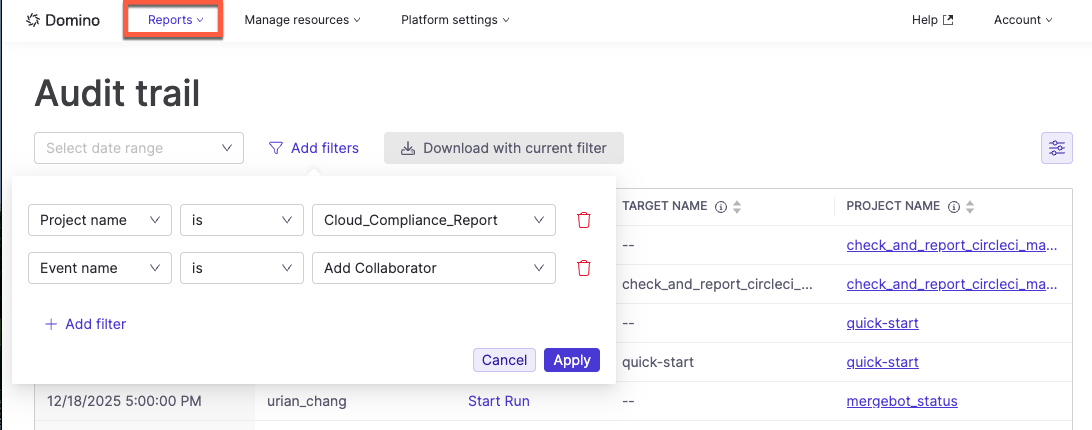
-
Click any event row to view full details.
To export filtered results, select Export, choose CSV, and save the file to your local system.
Example: Investigate dataset access
An administrator investigating unusual dataset uploads could use this configuration:
-
Event name =
dataset_uploaded -
User name =
is not empty -
Timeframe =
last 7 days -
Project name contains
marketing
This returns only dataset uploads from the past week performed by named users within marketing-related projects.
-
Export audit trail data using the Audit trail API. The data is JSON but can be parsed and stored in other formats, like CSV.
-
The Audit Trail Data Glossary has a complete list of events being tracked. You can use these in the event filter to search for events.