


As a Domino admin, you can configure one or more Posit Package Manager (PPM) servers from the Admin panel. You’ll provide the server’s connection details and can optionally restrict which repositories users are allowed to search from their workspace.
Before configuring a PPM server, make sure the following are in place:
-
A network-accessible PPM server
-
A configured API key for the PPM server
-
A Domino environment with an
updatePpmSnapshot.Rscript located at/home/ubuntuthat includes themanage_renv_environment()function. This script should handle:-
Package installation
-
renvupdates and snapshots -
Any logic needed to meet GxP compliance requirements
-
Click below to see the scrip content:
updatePpmSnapshot.R
manage_renv_environment <- function(
    cran_url,
    bioc_url = NULL,
    bioc_version = NULL,
    packages = NULL
) {

  # =================================================================
  # 0. ENSURE FULLY UNATTENDED EXECUTION
  # =================================================================
  # Grant consent for the one-time 'first use' prompt.
  original_consent <- getOption("renv.consent")
  options(renv.consent = TRUE)
  on.exit(options(renv.consent = original_consent), add = TRUE)

  # Force non-interactive behavior for all other operations (install, snapshot, etc.)
  original_interactive <- getOption("rlang_interactive", default = TRUE)
  options(rlang_interactive = FALSE)
  on.exit(options(rlang_interactive = original_interactive), add = TRUE)

  # =================================================================
  # HELPER FUNCTION
  # =================================================================
  build_repos_vector <- function(repos_list) {
    if (is.null(repos_list) || length(repos_list) == 0) return(c())
    # Handles both new and old lockfile formats
    if (is.list(repos_list[[1]])) {
      repo_urls <- sapply(repos_list, function(repo) repo$URL)
      repo_names <- sapply(repos_list, function(repo) repo$Name)
      names(repo_urls) <- repo_names
      return(repo_urls)
    } else {
      return(unlist(repos_list))
    }
  }

  # =================================================================
  # VALIDATE PARAMETERS
  # =================================================================
  if (missing(cran_url)) {
    stop("FATAL: The 'cran_url' parameter is required.")
  }
  if (!is.null(bioc_url) && is.null(bioc_version)) {
    stop("FATAL: 'bioc_version' is required when 'bioc_url' is provided for a new project.")
  }
  if (!requireNamespace("renv", quietly = TRUE)) {
    stop("FATAL: renv is not installed. Please install it in your user library.")
  }

  # Load the renv library to ensure all its components are fully loaded and accessible.
  library(renv)

  lockfile_path <- "renv.lock"

  # =================================================================
  # CHECK FOR EXISTING LOCKFILE AND EXECUTE CORRECT MODE
  # =================================================================

  if (file.exists(lockfile_path)) {

    # ----- UPGRADE MODE -----
    message("Existing renv.lock found. Performing a CRAN snapshot upgrade...")
    lockfile <- renv::lockfile_read(lockfile_path)

    # Persistently update the project's repository settings.
    message("Updating project settings with new repository URL...")
    current_repos <- build_repos_vector(lockfile$R$Repositories)
    if (!("CRAN" %in% names(current_repos))) stop("Could not find CRAN repository in lockfile.")
    current_repos["CRAN"] <- cran_url

    # <<< THE FINAL FIX IS HERE: Remove the 'renv::' prefix >>>
    # Since library(renv) was called, 'settings' is directly available.
    settings$repos <- current_repos

    # Now, update the lockfile itself to match the new settings
    message("Updating renv.lock file with new repository URL...")
    repos_list <- lockfile$R$Repositories
    if (is.list(repos_list[[1]])) {
      cran_idx <- which(sapply(repos_list, function(repo) repo$Name == "CRAN"))
      if (length(cran_idx) == 0) stop("Could not find CRAN repository in lockfile.")
      lockfile$R$Repositories[[cran_idx]]$URL <- cran_url
    } else {
      if (!("CRAN" %in% names(repos_list))) stop("Could not find CRAN repository in lockfile.")
      lockfile$R$Repositories[["CRAN"]] <- cran_url
    }

    renv::lockfile_write(lockfile, file = lockfile_path)
    message("renv.lock successfully updated.")

    message("Synchronizing project library with the new snapshot date...")
    renv::restore(prompt = FALSE)

    if (!is.null(packages) && length(packages) > 0) {
      message("Installing newly requested packages (and updating lockfile)...")
      renv::install(packages, prompt = FALSE)
    }

    message("Performing final library synchronization check...")
    renv::restore(prompt = FALSE)

  } else {

    # ----- INITIALIZATION MODE -----
    message("No renv.lock found. Initializing a new environment in the current directory...")

    repos_to_set <- c(CRAN = cran_url)
    if (!is.null(bioc_url)) {
      Sys.setenv(BIOCONDUCTOR_VERSION = bioc_version)
      repos_to_set <- c(repos_to_set, BIOC = bioc_url)
    }
    options(repos = repos_to_set)

    renv::init(force = TRUE, bare = TRUE, restart = FALSE)

    if (!is.null(packages) && length(packages) > 0) {
      message(paste("Installing", length(packages), "packages into project library..."))

      if (!is.null(bioc_url) && !requireNamespace("BiocManager", quietly = TRUE)) {
        renv::install("BiocManager", prompt = FALSE)
      }

      if (!is.null(bioc_url)) {
        renv::run(
          code = { BiocManager::install(packages, update = FALSE, ask = FALSE) }
        )
      } else {
        renv::install(packages, prompt = FALSE)
      }
    }

    renv::snapshot(prompt = FALSE, type = "all")
  }

  # =================================================================
  # ACTIVATE THE PROJECT IN THE CURRENT SESSION
  # =================================================================
  message("Activating the project to apply settings to the current R session...")
  renv::load()

  message(paste0("Script finished successfully for project: '", getwd(), "'"))
  message("Your session is now fully synchronized and configured.")
}These steps show you how to use the Admin panel to connect to a PPM server:
|
Note
|
Contact your Domino administrator if you don’t see the PPM Integrations menu option in the UI. This feature can be enabled by setting the Configuration record key com.cerebro.domino.workbench.workspace.enablePpmUI to true.
|
-
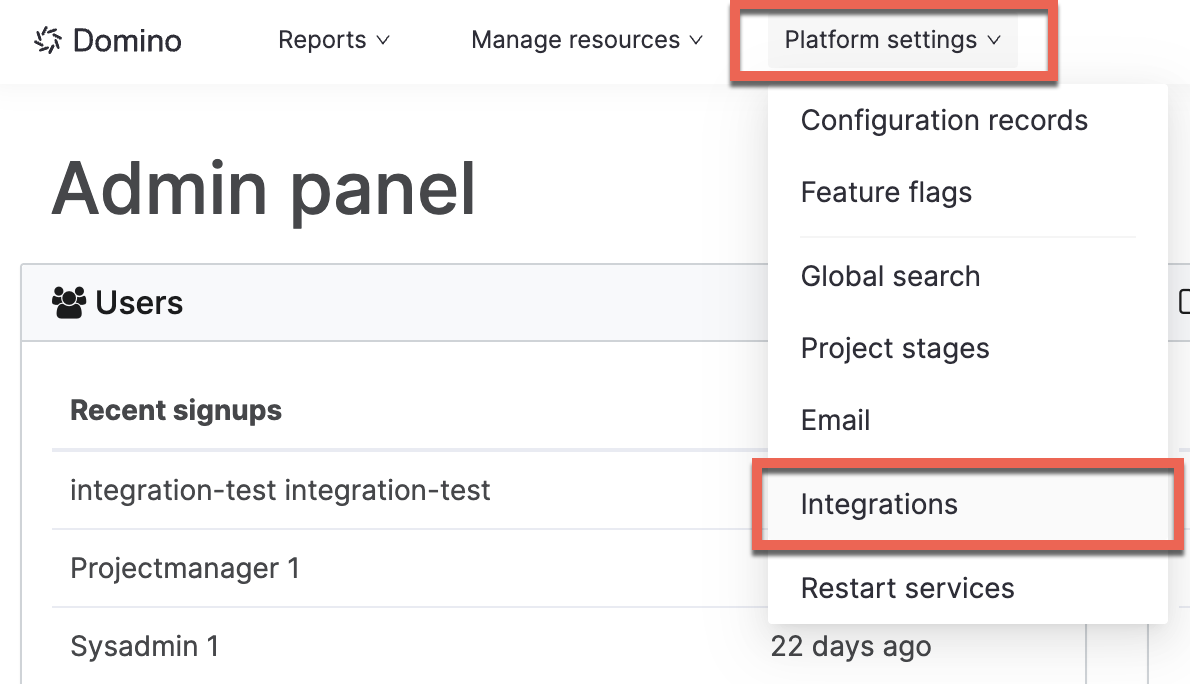
Open the Admin panel and go to Platform settings > Integrations.
-
Under Posit Package Manager, click Add PPM Server in the top right.
-
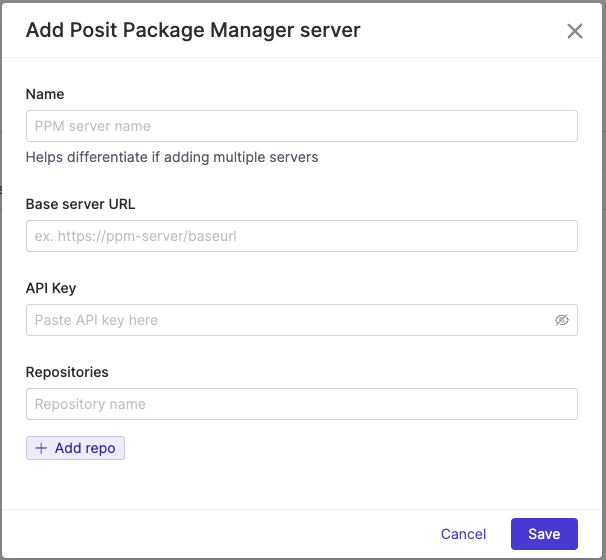
Fill in the required server details: Name, Base Server URL, and API Key.
-
To restrict snapshots by repository:
-
In the Repositories field, list the repository names you want users to search within.
-
If left blank, users will see snapshot results from all repositories available on the server.
-
-
Learn more about Platform management.