


An agentic system uses an LLM to plan, execute, and adapt across multiple steps. It’s typically a framework, such as LangChain, Pydantic AI, or OpenAI Agents SDK, or your own code. These frameworks wrap orchestration logic around LLM endpoints. Domino uses traces to instrument, evaluate, deploy, and monitor these systems.
You can clone a working example to see the full workflow in action:
-
simple_domino_agent: Minimal agent with tool calls, tracing, evaluation, and deployment.
-
rag-agent-demo: RAG agent with ChromaDB, same Domino instrumentation patterns.
-
simple_agent_api_only: REST API + A2A (agent-to-agent) example with bonus instructions on how to pair with a Domino-hosted agent registry and orchestrator.
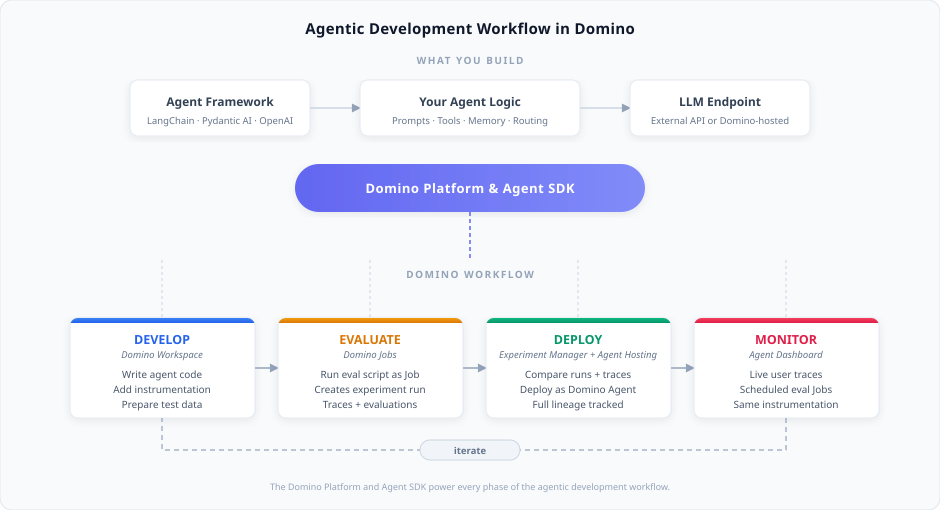
A trace is a structured record of every LLM call, tool invocation, and decision your agent makes. It captures token usage, latency, and cost. One decorator (@add_tracing) instruments your code. The same trace data flows through every phase:
-
Set up LLM access. Connect to an external LLM provider (OpenAI, Anthropic, Bedrock, or Azure OpenAI) or a Domino-hosted Model Endpoint. Store credentials as Domino environment variables.
-
Develop in a Domino Workspace. Write your agent code using any framework and add
@add_tracingwith inline evaluators to instrument it. Then prepare test data for your agent configuration. -
Evaluate by running your evaluation script as a Domino Job. Each Job creates an experiment run in the Experiment Manager. The run captures traces with evaluation scores for your agent configuration. Runs aggregate evaluation results across all traces.
-
Compare and deploy in the Experiment Manager. Compare runs (different agent versions or configurations) and individual traces within runs. Deploy directly from any experiment run that originated from a Job. Domino tracks full lineage between development and production, including commit, agent configuration, and performance results.
-
Monitor in the Agent Dashboard. The same
@add_tracinginstrumentation captures live user interactions as traces. Schedule evaluation Jobs to continuously score production traces and iterate when quality drops.
Your agents rely on LLM endpoints to process requests. You can connect to an external provider (OpenAI, Anthropic, Bedrock, Azure OpenAI) or host your own model in Domino.
-
Set up LLM access has details for both approaches.
-
The Agentic AI overview has conceptual background on what makes a system agentic.